NoteGPT

Visit

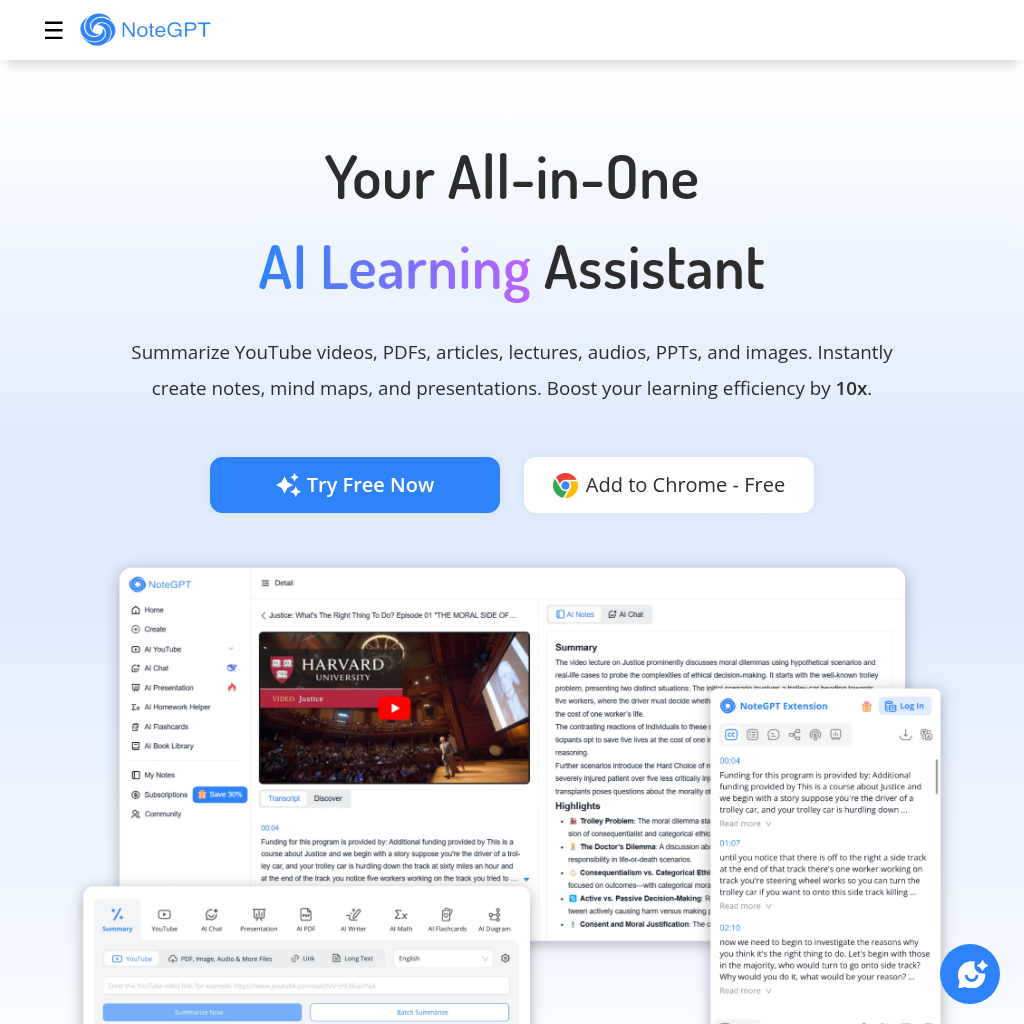
Your All-in-One AI Learning Assistant. Summarize, Chat & Write – Fast & Free.

NoteGPT introduction

Boost learning efficiency by 10x with advanced summarizer and generator tools. NoteGPT specializes in YouTube Video Summarizer and PDF Summarizer, supports various content types, and helps save key insights as personal notes in an AI-powered notes library.
Website:
notegpt.io
NoteGPT screenshot

NoteGPT overview

NoteGPT is an all-in-one AI learning assistant that helps learners and creators work 10× faster across summarizing, learning, research, writing, visual expression, image creation, and audio creation. It offers summarizers for YouTube, PDF, PPT, image, video, audio, book, and article content, plus tools for transcription, AI chat with multiple models, writing, slides, flashcards, quizzes, image editing, text-to-speech, and PDF translation. Users can save key insights as personal notes and build an AI-powered notes library for seamless knowledge management.

NoteGPT features

  • YouTube Video Summarizer
  • PDF Summarizer
  • Video and audio to text transcription
  • Text to speech and AI voice cloning
  • AI podcast generator
  • AI chat with ChatGPT, DeepSeek, Claude, and Gemini
  • AI essay writer and grader
  • AI flashcard maker and quiz generator
  • AI slides generator
  • AI image generation and editing tools
  • AI PDF translator
  • AI detector and humanizer

Questions about NoteGPT

NoteGPT pros

  • All-in-one AI assistant for summarizing, chatting, and writing
  • Supports many content types including YouTube, PDF, PPT, images, video, audio, books, and articles
  • Free plan available with 15 quotas per month and no credit card required
  • Built-in AI note library for saving key insights
  • AI chat supports multiple models: ChatGPT, DeepSeek, Claude, Gemini
  • Privacy commitments: ISO 27001, SOC 2, GDPR, CCPA; no third-party sharing; no AI training on personal data
  • Team plan available for schools, research groups, and teams
  • Reported popularity: 80,000,000+ users and 12,000+ schools/teams

NoteGPT limitations

  • Free plan limited to 15 quotas per month
  • Premium features require a paid plan
  • Unlimited access requires upgrading to a paid plan

NoteGPT use cases

  • Summarize YouTube videos
  • Summarize PDFs, papers, and lectures
  • Transcribe lectures, meetings, and recordings into text
  • Create notes and flashcards for studying
  • Generate slides and visuals for teaching
  • Create audio lessons and podcasts
  • Translate PDFs while keeping formatting
  • Get writing feedback and improve essays
  • Brainstorm and organize ideas visually
  • Review academic papers and extract key ideas
  • Distill long reports and visualize trends
  • Refine client communications

Who NoteGPT is for

  • Students
  • Educators
  • Professionals
  • Researchers
  • Content creators
  • Learners
  • Teams
  • Schools
  • Research groups

NoteGPT pricing

Free Plan: 15 quotas per month, activated upon login, no credit card required. Unlimited Plan: 50% off within 24 hours after signing up, unlock unlimited access. Team Plan: save more when subscribing with friends, ideal for schools, research groups, and teams.

Alternatives to NoteGPT