
AI Room Design
VisitAI room design and visualizer for free room makeovers
AI Room Design introduction
Upload a room photo to preview furniture, colors, rugs, and lighting while preserving doorways, windows, and walkways. Match real shoppable furniture within your budget.
- Website:
- airoomdesigntool.com
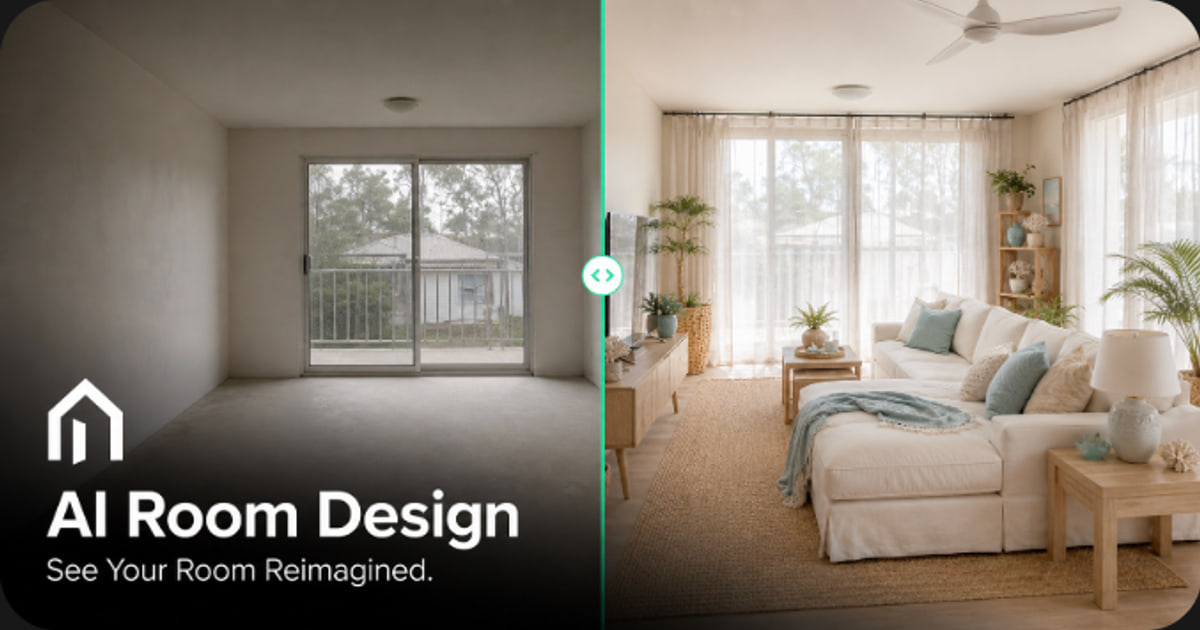
AI Room Design overview
AI Room Design turns photos of your actual space into realistic room designs. Choose from styles like Japandi, Mid-Century Modern, and Coastal, then edit selected pieces or keep the full layout. The tool includes visual product matching to find shoppable items similar to those in your render, with budget and brand filters.
AI Room Design features
- Upload JPG, PNG, or WebP room photos up to 10MB
- Keep Layout mode preserves walls, door swings, window frames, and walkways
- Light Refresh and Major Remodel modes for different levels of change
- 12 design styles including Japandi, Mid-Century Modern, Coastal, and Modern French
- Point Edit and Area Edit to change selected sofa, rug, or wall colors and materials
- Visual product matching across major home retailers
- Budget range setting from affordable essentials to designer statements
- Preferred brand filters such as West Elm, IKEA, Target, and Wayfair
- Shopping list with direct store links and live prices
- 4 free Starter Credits on sign-up with no credit card required
- Ultra (4K) export with no watermarks on paid plans
- One-click deletion of uploaded photos and generated renders
Questions about AI Room Design
AI Room Design pros
- Free Starter Credits on sign-up require no credit card
- Keep Layout mode preserves existing architecture like doors, windows, and walkways
- Visual product matching finds budget-friendly shoppable items with direct store links
- 12 style options available for room transformations
- Point Edit and Area Edit allow localized changes without redesigning the whole room
- Paid exports include 4K resolution with no watermarks
- Cancel anytime in account settings
- Privacy controls include one-click deletion of photos and renders
AI Room Design limitations
- AI-generated designs are not perfectly replicable; the tool finds visually similar real products instead
- Results require users to verify dimensions, clearances, stock, and local availability before purchasing
- Camera lens distortion may affect furniture scale, so measuring is recommended before buying large items
- Users are advised to avoid uploading sensitive content
- Free usage is limited to 4 Starter Credits on registration
- Ultra (4K) render quotas are smaller than Basic (1K) quotas within each paid plan
AI Room Design use cases
- Preview sofas, bed frames, paint, and lighting in seconds
- Check whether large furniture will fit before buying
- Create renter-friendly reversible makeovers without permanent changes
- Plan a cohesive whole-home design across multiple rooms
- Generate a budget-conscious shopping list from a room design
- Compare design styles side by side on your actual room
- Test non-damaging upgrades like peel-and-stick lighting and area rugs
- Refresh a room without moving heavy furniture
Who AI Room Design is for
- Homeowners planning room refreshes
- Renters wanting reversible upgrades
- New home residents planning whole-room looks
- Furniture shoppers checking proportions before purchase
- People without design backgrounds
- Budget-conscious decorators
- Users who want visual product matching with store links
- Anyone wanting private, encrypted room photo processing
AI Room Design pricing
Every new account receives 4 free Starter Credits with no credit card required. Paid plans are billed annually: Starter $9.9/month ($119/year), Pro $24.9/month ($299/year), and Max $49.9/month ($599/year). Paid plans include Basic and Ultra generation quotas, 4K export with no watermarks, commercial use, private projects, and automatic refunds for failed generations.